Domestic Cleaners
Are you looking for more than just a cleaner? I am DBS checked self employed cleaner and have a full driving licence. Your home will be in good hands, well looked after and will sparkle once I have been around and given it that special touch. If you would like your home to be given the ‘Fairy Sparkles’ treatment, please get in touch.
Domestic Cleaning Service
Affordable Cleaning services in Chester, Wrexham, Frodsham and throughout Cheshire

Full House Cleaning Service
Looking after a full house is my speciality. Keeping everything in order, neat & tidy as well as being clean & smelling lovely.
Your house should feel like a clean home. Regain your sparkle with Fairy Sparkles.

Regular House Cleans
The most popular cleaning service is a regular house clean, this can be either weekly, fortnightly or monthly.
It allows me to keep on top of the little jobs and give you a regular all round sparkling feeling.
Cleaning for Special Occasions
Preparation for a special occasion like Christmas, Easter, Birthday or family gathering.
Have your home sparkling and clean for the big day, don’t forget to get in touch if you want me to clean up afterwards too!
Kitchens Cleaned
Deep clean of worktop surfaces, tops & faces of cupboards, hob, sink & drainer, windows, floor & skirting boards.
Anti-bacterial products used to keep away the germs!
Bathroom Cleaning Service
A deep and fresh clean of everything in your bathroom & en-suite.
A sparkle on your sink, toilet, bath & shower using anti-bacterial & bleach products to keep all the germs away.

Domestic Room Cleans
Hoovering, mopping, dusting & wiping down of surfaces to give your rooms a good clean.
Home offices & games rooms also catered for. Everything in sight will be given the Fairy Sparkles treatment.
Am I one of the best cleaners in the area? Many people think so

 Laura Sanders2024-03-08I cannot recommended Sophie highly enough. She’s always punctual and polite with good communication. We had an amazing clean yesterday. With 3 children under 4 I really struggle with the cleaning, Sophie really helps to keep on top of things! So Thankyou!
 Ellie Ward2024-03-08Really happy with the service provided by Fairy Sparkles. Excellent communication when booking and on the day of cleaning. I felt comfortable having Sophie in my home while I was working. It was excellent to come home to a sparkling clean and beautiful smelling home!
 Barbara Dewhurst2024-03-08Sophie is most professional, punctual and polite. She gives an excellent service and I would highly recommend her to anybody who wishes for a top class clean.
 mick wilkinson2024-03-08Excellent, service works hard. Start to finish nothing but a positive experience.
 Derek Booth2024-02-26The best cleaner I have had clean my house. Sophie has left everywhere sparkling clean again. A full house clean including the ensuite, amazing job Sophie.
 Emma Kelly2023-11-09I'd be lost without Sophie and her fortnightly cleans. She always leaves my home immaculate and she makes my life so much easier with a toddler and a baby on the way! I'd recommend her services to anybody,fantastic xxx
 Hannah Graham2023-11-09Sophie did a great job- thorough clean and on time and professional
 Lucy Barker2023-11-04Really impressed with the deep clean, the house was immaculate from top to bottom! I would definitely recommend.
 Michelle Roberts2022-10-21Disappointed with my first clean, booked and paid for 3 hours but Sophie arrived late and left early!! Was not impressed with the standard of cleaning considering it was suppose to be a deep clean, a lot of areas not touched. Pity as wanted a regular and reliable cleaner and her service is not cheap at £20 an hour
 Diane Duff2021-11-30Can’t recommend Sophie and Fairy Sparkles Cleaning Services highly enough. Arrived on time, provided all the necessary cleaning materials and did a fabulous job leaving the house looking immaculate. Also great value for money.
Species of germs in the average household - Tel or Message for Cleaning Services



Areas Covered by Fairy Sparkles Cleaning Services
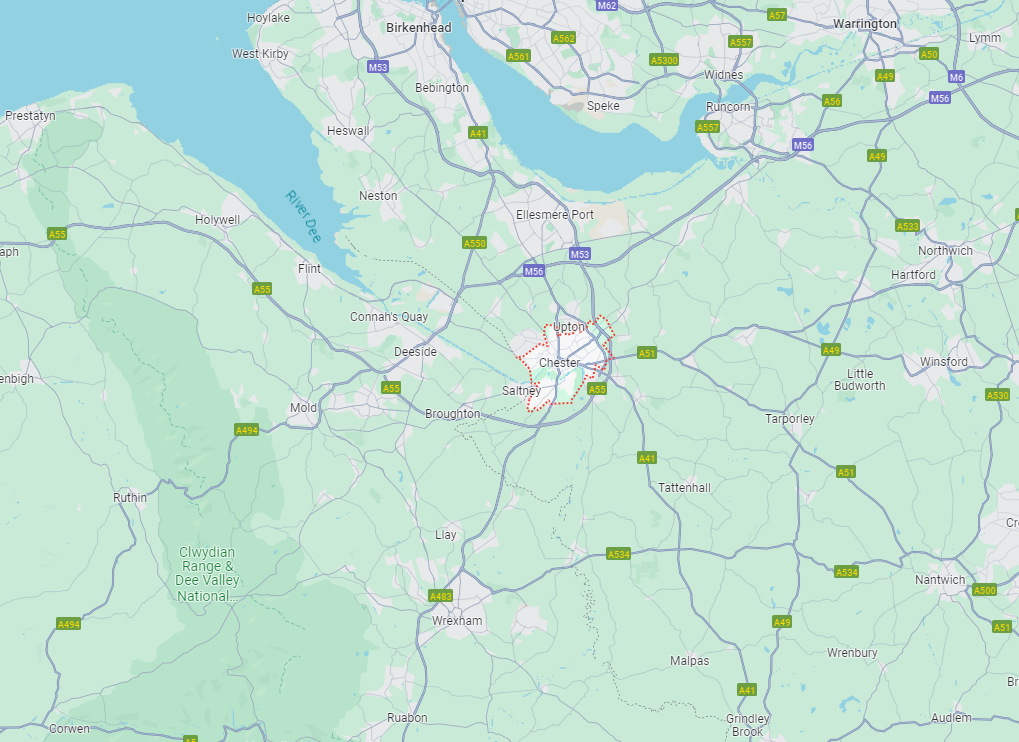
Cleaning Services – (Affordable Self Employed Cleaner)
- Cleaning Services Near Me in Bangor-on-Dee
- Cleaning Services Near Me in Borras
- Cleaning Services Near Me in Buckley
- Cleaning Services Near Me in Caerwys
- Cleaning Services Near Me in Cheshire
- Cleaning Services Near Me in Chester
- Cleaning Services Near Me in Christleton
- Cleaning Services Near Me in Deeside
- Cleaning Services Near Me in Elton
- Cleaning Services Near Me in Ewloe
- Cleaning Services Near Me in Frodsham
- Cleaning Services Near Me in Gresford
- Cleaning Services Near Me in Halkyn
- Cleaning Services Near Me in Hawarden
- Cleaning Services Near Me in Helsby
- Cleaning Services Near Me in Higher Kinnerton
- Cleaning Services Near Me in Hooton
- Cleaning Services Near Me in Kingsley
- Cleaning Services Near Me in Manley
- Cleaning Services Near Me in Marchwiel
- Cleaning Services Near Me in Mollington
- Cleaning Services Near Me in Mouldsworth
- Cleaning Services Near Me in Mynydd Isa
- Cleaning Services Near Me in Nannerch
- Cleaning Services Near Me in New Brighton
- Cleaning Services Near Me in Northop
- Cleaning Services Near Me in Overton
- Cleaning Services Near Me in Penley
- Cleaning Services Near Me in Penyffordd
- Cleaning Services Near Me in Preston Brook
- Cleaning Services Near Me in Rhosddu
- Cleaning Services Near Me in Rhosnesni
- Cleaning Services Near Me in Rossett
- Cleaning Services Near Me in Ruabon
- Cleaning Services Near Me in Runcorn
- Cleaning Services Near Me in Saltney
- Cleaning Services Near Me in Stretton
- Cleaning Services Near Me in Sutton Weaver
- Cleaning Services Near Me in Warrington
- Cleaning Services Near Me in Waverton
- Cleaning Services Near Me in Widnes
- Cleaning Services Near Me in Wrexham
- Cleaning Services Near Me on the Wirral
Let me do your cleaning so you can enjoy free time